Vigience
MCP for SAP

Agentic AI needs real-time
SAP actions so AI can act,
not just analyze

Curated, customer-specific MCP servers that give AI agents, people and developers governed access to the SAP processes and data relevant to their work, live and in real time, on any surface and in any IDE, with nothing installed inside SAP.

Curated SAP access for AI-agents

Vigience MCP exposes the SAP, Salesforce and other systems of record processes and data that are relevant to your use cases, as clear, concise tools an agent can use well. It runs on Vigience Overcast, the platform that has done this for Salesforce customers for more than ten years.

200+
prebuilt, pre-integrated components
80%
of typical requirements covered out of the box

Most of what a customer needs already exists: more than 200 prebuilt, pre-integrated components cover 80 percent or more of typical requirements, from customer master data to orders, quotes, deliveries and assets. What is missing is configured with the Overcast Component Builder, without code, against SAP’s public APIs. Vigience maintains every component through SAP and Salesforce releases, for all customers at once.

Prebuilt content covers typical SAP use cases, such as:

  • List of sales orders
  • Status of a delivery
  • Product availability check (ATP)
  • Asset health report across Salesforce and SAP data
  • Automatically generate a service report for a service technician
  • Create a sales order with live pricing and availability
  • Create quotation in SAP and Salesforce

Built once, shipped to all:

1
Configured for one customer
2
Productized into the Overcast core
3
Available to every customer as a component

One MCP server. Every surface, every IDE, every SAP system.

Several systems, one answer
A Vigience MCP server brings data from more than one system together: Salesforce and SAP, or the several SAP systems most large companies run, often ten or more. The agent asks once and does not need to know which system holds which fact.
Any surface
The same server serves Claude, ChatGPT, Agentforce, Copilot, Slack, web and mobile. You build once and serve every channel.
Any IDE
Point Cursor, Claude Code or Codex at a scoped SAP contract and build SAP-connected apps without learning the customer’s SAP configuration first.
Live read and governed write
Agents read in real time from the system of record and post sales orders, quotes and service orders back to SAP through a controlled commit path.
Three editions
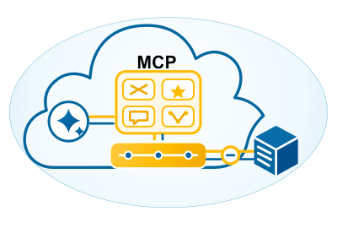
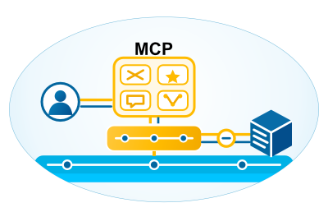
Vigience MCP runs on Salesforce and Agentforce, on MuleSoft, or standalone for SAP-only customers.

Three editions, tailored to each customer

Vigience MCP comes in three editions, each tailored to the customer’s needs, from the MCP servers themselves to the surrounding layers.

Runs inside your Salesforce org

Vigience MCP for Salesforce

For enterprises running Salesforce that want the MCP server inside their org alongside Agentforce.

Runs on your MuleSoft platform

Vigience MCP for MuleSoft

For enterprises running MuleSoft that want to build their own bespoke MCP server using Vigience accelerators, SAP APIs, skills and more.

Runs without Salesforce CRM

Vigience MCP Standalone

For SAP-only environments without Salesforce. Connects to various backends, including SAP and non-SAP, as well as SAP BTP and MuleSoft.

What is tailored in every installation:

MCP servers and API access
The curated set of SAP operations and fields for the customer’s specific use cases.
Experience layer
The surfaces where people and agents work (Agentforce, Slack, Claude, ChatGPT, Copilot, or the IDE).
Identity
Every request executes as a named user or agent, with continuous identity from the surface through the MCP server into SAP.
Access and authorization
SAP authorizations and platform permissions determine exactly what can be read and written.
Compliance and governance
Approvals, logging, and a full audit trail: every change is attributable, and no commit reaches SAP without human confirmation or pre-authorization.

5 Problems Vigience MCP Solves for Your AI Agents

Real-time data from SAP running wherever your people work, audited all the way through.

Why Do Agentic AI Projects Fail? – Reasons

The Solution for
Agentic AI Integrations

Read-only limitations

By default, agents can only read data from their own platform. SAP remains unreachable, so they cannot reserve parts, create orders, or issue invoices.

Action-capable agents

Vigience MCP exposes safe SAP operations so agents can execute transactions (order creation, parts issuance, time logging, billing) directly from Agentforce, Claude, ChatGPT, Copilot, or Slack.

Missing business truth

Quotes and decisions lack SAP pricing, ATP checks, warranty, and credit status. Agents guess, and errors must be corrected manually.

Full SAP context before acting

Agents check live SAP business rules and data first, then act. Pricing, contracts, and credit limits are validated directly in-flow.

Too much SAP complexity

SAP exposes tens of thousands of APIs and tables. A generic MCP server overwhelms the LLM, leading to hallucinations and wrong actions.

Curated per customer

Each Vigience MCP server is tailored in days to your specific SAP customizing (e.g., exactly the 50 relevant operations with 20 fields).

Unsafe automation

Bespoke scripts run outside enterprise policy without approval workflows and audit trails.

Governed execution

Vigience MCP enforces permissions, approvals, and rollbacks. No commit reaches SAP without authorization; every step remains traceable.

Batch delays and handoffs

Nightly syncs and handoffs slow processes down; errors surface hours later.

Immediate validations and confirmations

In-line validation against SAP rules within the interaction; immediate feedback or routed exceptions.

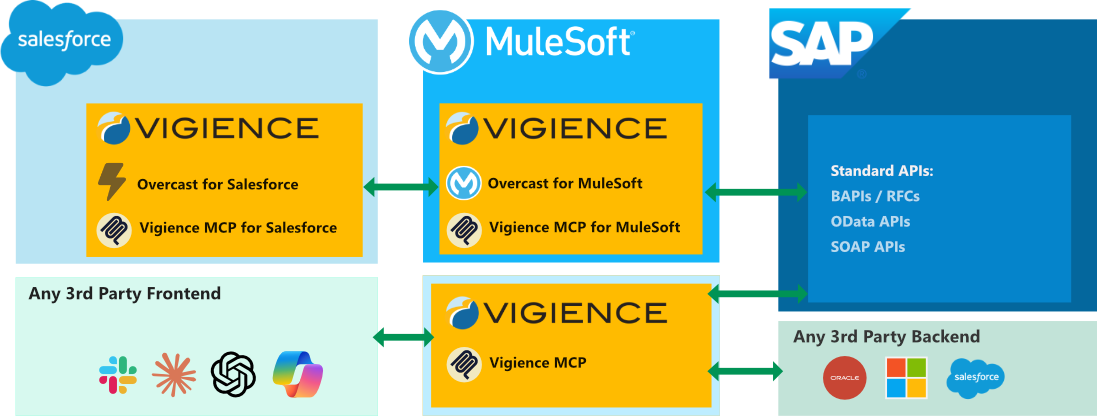
Vigience MCP Solution Architecture

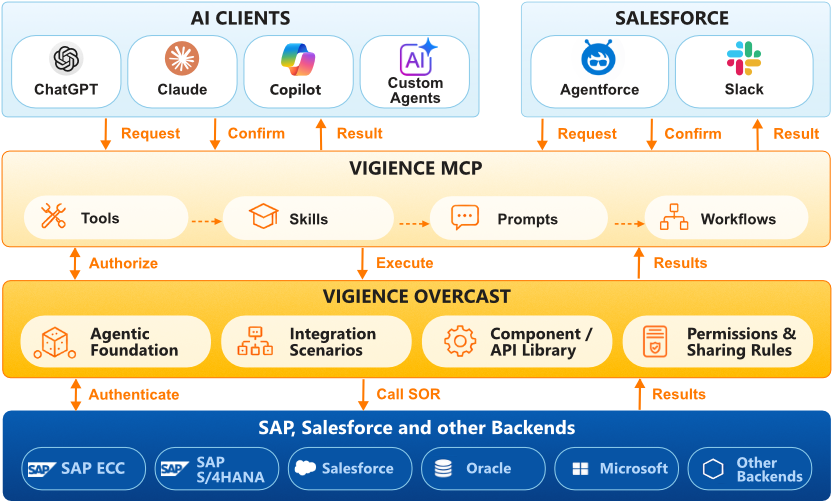
With Vigience MCP, your users and agents can analyze and act on SAP data wherever they work. Design-time tools provide prebuilt SAP integrations and allow creating new ones with point-and-click ease. The MCP server can run on Salesforce, MuleSoft, or standalone. Nothing is installed inside SAP: it works across SAP ECC, SAP S/4HANA Private Cloud Edition, and SAP S/4HANA Public Cloud while keeping the core clean. Beyond SAP, the MCP server can also connect to other third-party backends including Salesforce, Oracle, and Microsoft.

Frequently Asked Questions (FAQ)

Practical Information About Vigience MCP

A curated, customer-specific Model Context Protocol server that gives AI agents, people, and developers governed, real-time read and write access to relevant SAP processes and data, with nothing installed inside SAP.

Without connection, agents are limited to their host platform’s data. Connected to SAP, they can autonomously resolve returns, orders, parts requests, warranty claims, and invoices.

A generic server dumps the entire API catalog on the LLM, causing confusion and hallucinations. Vigience MCP curates only the required operations, brings multiple SAP systems together, and adds essential governance (authorizations, pre-commit confirmations, audit trails).

Traditional integrations sync records between systems. Vigience MCP enables agents and humans to run, update, and complete real-time SAP transactions in-flow to resolve cases with AI.

SAP S/4HANA (Public & Private Cloud), SAP ECC, and SAP Business One via BAPIs, RFCs, and OData APIs.

No. The standalone edition runs completely without Salesforce.

Any MCP-compliant client, including Claude, ChatGPT, Copilot, Agentforce, Slack, and IDEs such as Cursor, Claude Code, and Codex.

Yes. Because nothing is installed inside SAP and access runs through SAP’s public APIs, the same server works on SAP ECC, SAP S/4HANA Private Cloud edition, and SAP S/4HANA Public Cloud.

Only when pre-approved by policy. By default, a named human confirms each transaction. For automated workflows, you set policies once and the platform applies them on every run, always maintaining a full audit trail.

Ja / Yes. Every SAP action executed through Vigience MCP is logged and attributable to the responsible human or agent: what was suggested, what was verified, who confirmed it, and what was committed.

Yes. Agents operate strictly within the boundaries and authorizations of your SAP and Salesforce security model and the individual user’s permissions. Admins define policies, and the platform enforces them.

A curated MCP server for a first workflow is configured in days, and most customers go live with a full use case in weeks rather than months. The implementation process is standardized and metadata-driven.

Billed per user per month (starting from $10/user/month).

No. Vigience MCP runs with or without middleware. It works alongside your existing tools and can run on MuleSoft if that is your enterprise integration platform.

Yes. Many customers begin with a single workflow, like warranty verification or order status checks, and expand progressively to full automation.

Vigience MCP is available in an early-access program for selected customers. Contact Vigience for a demo, watch the overview video, or request a proof of concept on your own SAP data and workflows.

The #1 Salesforce-Native Integration App

  • Overcast is a Salesforce-native cloud integration service that lets you quickly and easily connect Salesforce to your SAP, Oracle, Microsoft and other on-premise applications.
  • No on-premise software or middleware installations.
  • Thousands of SAP business objects can be integrated in a point-and-click fashion.